Actions
Clicking + Add action shows sixteen actions.
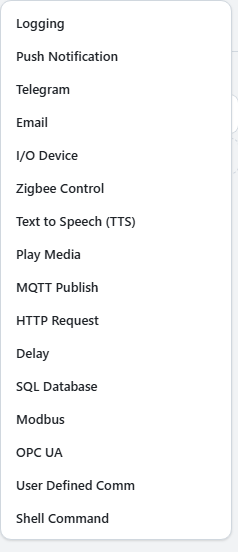
| Purpose | Actions |
|---|---|
| Send notifications | Push Notification, Email, Telegram |
| Keep records | Logging |
| Play sound | Play Media, Text to Speech (TTS) |
| Control equipment | I/O Device, Zigbee Control, Modbus, OPC UA, User Defined Comm |
| Integrate with software | MQTT Publish, HTTP Request, SQL Database, Shell Command |
| Wait | Delay |
Actions run top to bottom, and rows can be dragged to reorder them. Order matters when an action takes time: a notification that takes one second delays everything after it by that amount. Insert a Delay between actions to space them out, for example to play a warning, wait, and only then cut power.
Note
Actions that can attach a photo (push, email, Telegram, logging) share one snapshot
per event. The photo is captured once when the rule fires and every action attaches
the same image, so the photo on your phone and the photo in the log always match. If the
rule watches multiple cameras, select which camera the photo comes from in the action
settings.
Caution
To receive push notifications, the Grablo app must be installed on the phone, signed in
with the same account, and allowed to send notifications in the phone's settings.