Communication
The communication items register, in advance, the connections the controller uses to exchange data with external equipment and servers. A registered connection is then selected from the action of the same name.
MQTT Client
Enter the host and port. The default port is 1883 without encryption and 8883 with SSL/TLS. Connection Timeout (3 seconds by default) is the longest the client waits for the broker connection; once it expires, the connection is treated as failed. Client ID must be unique within the broker and is generated automatically if left empty. If the broker requires credentials, turn on User Authentication and enter the user and password; turning on SSL/TLS Encryption adds the client certificate, client private key, and CA certificate, each registered by uploading the file. With encryption on, every message exchanged with the broker is encrypted.
A Will Message is what the broker publishes on your behalf when the connection drops abnormally; set its topic (e.g. clients/device1/status), message, QoS, and retain flag. QoS 0 sends without checking for a response, QoS 1 resends until acknowledged (so duplicates are possible), and QoS 2 guarantees exactly one delivery (QoS 1 by default). Higher numbers are more reliable but use more network capacity. With Retain Message on, the broker keeps the Will message, so a subscriber that connects after the disconnection receives it immediately; retaining an “offline” message, for example, tells every later subscriber the state of this client.
Modbus
Type selects RTU Master (the default), RTU Slave, TCP Master, or TCP Slave. RTU takes a serial port with baud rate, parity bit, stop bit, and data bits; TCP takes an IP address and port (502 by default). A TCP slave sets Max Connections, the number of masters that may connect at once (16 by default).
| Field | Shown for | Description |
|---|---|---|
| Serial Port | RTU Master, RTU Slave | The serial port the device is connected to; find it with the search button or type it in (e.g. COM3 on Windows, /dev/ttyACM0 on Linux). |
| Baud Rate (bps), Parity Bit, Stop Bit, Data Bits | RTU Master, RTU Slave | Serial line settings, which must match the equipment on the other end. Baud rate is 1200 to 921600 (9600 by default), parity is None (default), Odd, or Even, stop bit is 1 (default) or 2, and data bits are 5 to 9 (8 by default). |
| Unit ID | RTU Slave | This slave's own number (1 to 247, 1 by default), also called the slave ID or address. When several slaves share a line, the master picks one by this number. |
| IP Address | TCP Master | The IP address of the TCP slave to connect to (e.g. 192.168.0.50). A trailing :port (192.168.0.50:502) is handled automatically. |
| Connection Timeout | TCP Master | The longest wait for the TCP slave connection (3 seconds by default); once it expires, the connection is treated as failed. |
| Max Connections | TCP Slave | The number of masters that can be connected at the same time (1 to 255, 16 by default). |
| Register Size, Bit Size | RTU Slave, TCP Slave | The size of the register area and the bit area of the slave memory (1 to 256 each, 8 by default). |
| Register Mapping, Bit Mapping | RTU Slave, TCP Slave | Map a Numeric variable to each register address and a Digital variable to each bit address. |
When running as a master, the Unit ID of the slave to talk to is not a setting; it is given per request in the Modbus Communication action.
Running as a slave, set the Register Size and Bit Size and map a variable to each address. Grablo's slave memory does not separate inputs from outputs: it has only a register area and a bit area. Coils and discrete inputs use the bit area, holding and input registers use the register area, and addresses start at 0.
OPC UA Client
Enter the host, the port (4840 by default), and the Response Timeout (10 seconds by default), which is the longest the client waits for the server to answer a request; once it expires, the connection is treated as lost. If the server requires credentials, turn on User Authentication and enter the username and password. Turning on SSL/TLS Encryption adds a certificate file, a private key file, an Encryption Method, and a Security Mode. Grablo ships default certificate and key files (cert.der, key.der) that are already filled in, so they can be registered with the server and used as they are; upload your own files to replace them.
| Field | Value | Description |
|---|---|---|
| Encryption Method | Basic256Sha256 | The default. Strong symmetric encryption with 256-bit AES, using SHA-256 hashing to verify integrity. |
| Aes128_Sha256_RsaOaep | 128-bit AES with SHA-256 and RSA-OAEP key exchange, balancing performance and security. | |
| Aes256_Sha256_RsaPss | 256-bit AES with SHA-256 plus RSA-PSS signatures, suited to high security requirements. | |
| Security Mode | Sign Only | Messages are signed with the private key but not encrypted. Used on trusted networks. |
| Sign and Encrypt | The default. Messages are signed with the private key and encrypted with the recipient's public key. Used where security is required. |
User Defined Communication
Nine types are supported: serial, TCP client and server, UDP client and server, shared memory, WebSocket client, and Bluetooth client and server. Serial takes a port and line settings, TCP, UDP, and WebSocket take a host and port, shared memory takes a name and size, and Bluetooth takes a local HCI index; a Bluetooth client also takes the remote MAC address of the server to connect to.
| Field | Shown for | Description |
|---|---|---|
| Serial Port | Serial | The serial port the device is connected to; find it with the search button or type it in (e.g. COM3 on Windows, /dev/ttyACM0 on Linux). |
| Baud Rate (bps), Parity Bit, Stop Bit, Data Bits | Serial | Must match the equipment on the other end. The choices and defaults are the same as for Modbus (9600, None, 1, 8). |
| Host | TCP Client, UDP Client, WebSocket Client | The IP address or hostname of the server to connect to (e.g. 192.168.0.10, myserver.local). |
| Port | TCP and UDP client and server, WebSocket Client | The port to connect to or listen on (3000 by default). |
| Connection Timeout | TCP Client, WebSocket Client | The longest wait for the server connection (3 seconds by default); once it expires, the connection is treated as failed. |
| Shared Memory Name, Shared Memory Size (bytes) | Shared Memory | The name must match the peer program (e.g. grablo_shm1); the size is 1 to 65535 bytes (256 by default). |
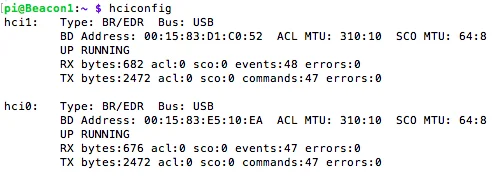
| Local HCI Index | Bluetooth Client, Bluetooth Server | The number of the Bluetooth adapter on the controller. Use the scan button to find adapters; with a single adapter, keep the default (hci0). |
| Remote MAC Address | Bluetooth Client | The MAC address of the Bluetooth server to connect to, in any of the forms AA:BB:CC:DD:EE:FF, AA-BB-CC-DD-EE-FF, or AABBCCDDEEFF. |
| Receive Timeout | All types except UDP and shared memory | 10 milliseconds by default. See below. |
Receive Timeout is how long to wait for the next byte after the last one arrived. Once it expires, no further data is assumed to be coming, which makes this value decisive when exchanging frame-based data. A shared memory name must match the other side's; an existing shared memory with that name is reused, and otherwise a new one is created.
On a Linux controller, the hciconfig command in a terminal or SSH session
shows each Bluetooth adapter's HCI index (hci0, hci1) and MAC address (BD Address).