All Items
For example, registering a Telegram bot in Settings makes it selectable in Action → Telegram Message.
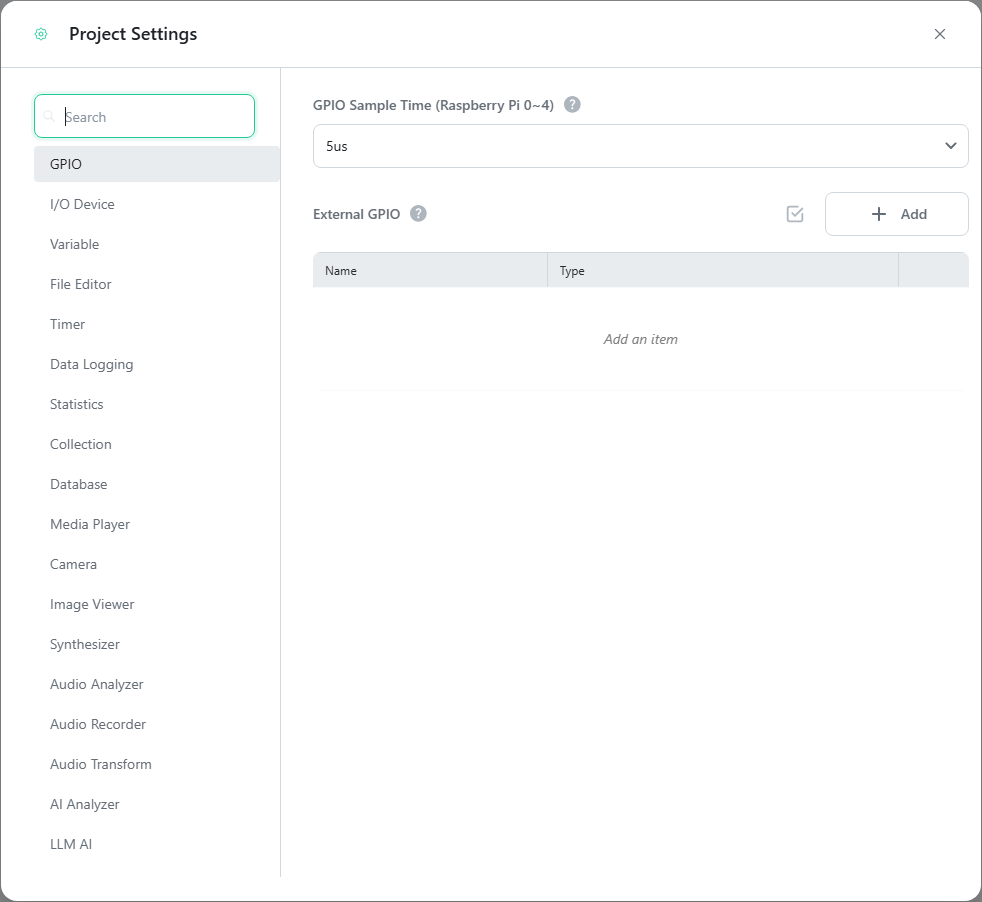
The full list of setting items is as follows. The groups match the item groups on screen, and the list is in the same order as the screen.
| Group | Item | Description |
|---|---|---|
| Hardware | GPIO | Sets the GPIO sample time and registers USB-GPIO adapters (External GPIO). |
| I/O Device | Registers LEDs, sensors, LCDs, motors, and other devices used by I/O Device Control. | |
| System | Variable | Defines the project-wide variables shared by logic, devices, and dashboards. |
| File Editor | Registers the file editors used by the Read/Write File action. | |
| Timer | Registers timers used by the Timer action. | |
| Data Logging | Creates channels that record variable values automatically at intervals or manually via the Data Logging action. | |
| Data | Statistics | Registers the statistics used by the Statistics action, together with the numeric variable to calculate them from. |
| Collection | Registers collections used by the Collection action. | |
| Database | Registers database connections used by the Database action. MySQL, PostgreSQL, SQLite, ODBC, and Firebase DB are supported. | |
| Media | Media Player | Registers players used by the Play Media action. |
| Camera | Registers cameras used by the Camera action and AI Analysis. | |
| Image Viewer | Registers viewers used by the Display Image action. | |
| Synthesizer | Registers instruments used by the Synthesizer action. Sounds come from a SoundFont file (sf2, sf3), and a default one is included. | |
| Audio Analyzer | Registers analyzers used by the Audio Analysis action. The audio source is either the microphone (input) or the speaker (output). | |
| Audio Recorder | Registers recorders used by the Record Audio action. | |
| Audio Transform | Registers transformers used by the Transform Audio action. | |
| AI | AI Analyzer | Registers analyzers used by the AI Analysis action. |
| LLM AI | Registers LLM providers (OpenAI, Anthropic, Gemini, etc.) used by LLM AI Query. | |
| Text-to-Speech | Registers TTS services used by the Text-to-Speech action. | |
| Speech-to-Text | Registers STT services used by the Speech-to-Text action. | |
| IoT | Telegram Bot | Registers bots used by the Telegram Message action. |
| Email Client | Registers clients used by the Send Email action. | |
| Zigbee Device | Registers devices discovered from the Zigbee2MQTT bridge. | |
| Home Assistant | Registers server connections used by Home Assistant Integration. | |
| Communication | MQTT Client | Registers clients used by MQTT Communication. |
| OPC UA Client | Registers clients used by OPC UA Communication. | |
| Modbus | Registers an RTU Master, RTU Slave, TCP Master, or TCP Slave used by Modbus Communication. | |
| User Defined Communication | Registers the connections used by User Defined Communication. Nine types are supported: serial, TCP and UDP client and server, shared memory, WebSocket client, and Bluetooth client and server. | |
| Control | PID Control | Registers controllers used by the PID Control action. Set the control mode to Direct when a rising output raises the measured value, and Reverse when it lowers it. |
The most frequently used items are described in detail below.