Person Recognition
With person recognition on, people are detected on every camera in the place, recorded, and grouped into People cards. Person recognition is on in new places.
- On the Settings tab, click the Person recognition row.
- Turn it on or off with the switch at the top, and choose values for the items you want to change.
- Return to the settings list and click Save at the bottom of the screen.
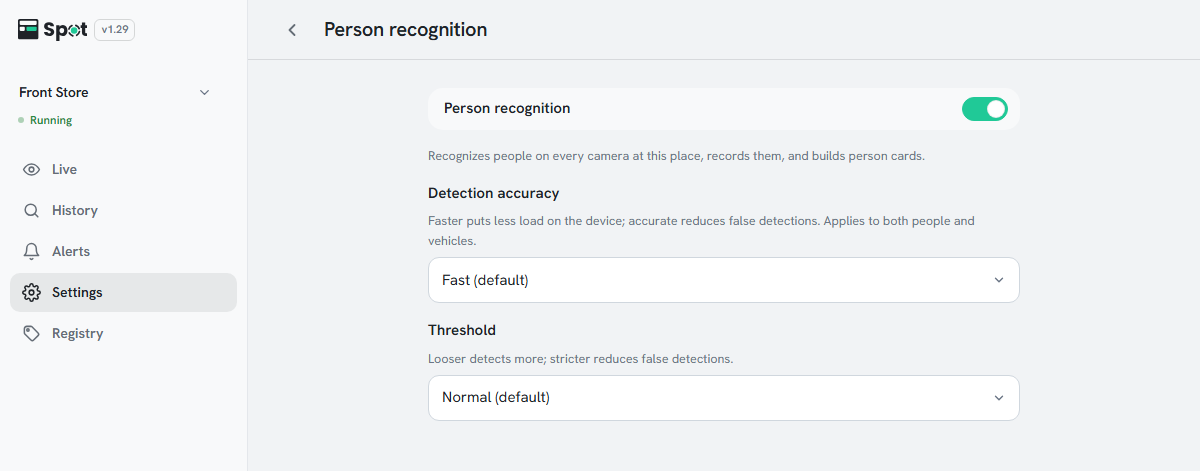
| Setting | What it does | When to change |
|---|---|---|
| Detection accuracy | The precision of the analysis that finds people and vehicles. Higher precision puts more load on the device. | Fast on a Raspberry Pi, Accurate on a PC or Jetson |
| Threshold | The criterion for judging something to be a person. | Strict if mannequins or posters are detected |
Note
Detection accuracy shares its value with vehicle recognition; changing it on one screen changes it on the other.
At least one of person, face, and vehicle recognition must stay on, so the switch cannot be turned off while person recognition is the only one on.
Options, defaults, and turning person recognition off
- Detection accuracy: Fast (default), Balanced, or Accurate.
- Threshold: Loose, Normal (default), or Strict. Does not affect speed.
- Turning person recognition off pauses "Person detected" alerts, and the alert list shows Stopped: person recognition is off. Person boxes are no longer shown on the Live and History screens.
- When person recognition and face recognition are both off, People is not shown on the History tab.