Date/Time
Creates, calculates, and converts values of the three types Date, Time, and Duration. A date is a year-month-day, a time is a time of day, and a duration is an elapsed span made of hours, minutes, seconds, and milliseconds.
- System Uptime can represent up to 4,294,967,295 milliseconds (about 49.7 days) and starts over from 0 when that is exceeded.
- If the result of Add to Time becomes negative or exceeds 24 hours, it is calculated as the time on the previous or next day.
- If the result of Add to Duration becomes negative, 0 hours 0 minutes 0 seconds 0 milliseconds is returned.
- Weekday numbers start at 0 for Monday and end at 6 for Sunday. Weekday names are returned as English abbreviations such as "THU".
- Current Timestamp is text in the format YYYY-MM-DD HH:MM:SS.
- The output type of Unix Timestamp is [Duration], not [Number]. To get a number of milliseconds, connect it to the Duration to Milliseconds block.
- The blocks that calculate a difference return the second value minus the first (value2 - value1), so the sign depends on the input order.
Date Input
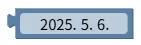
Creates a date constant by selecting a date in the block's calendar field.
- Input: none (calendar field)
- Output: selected date [Date]
Time Input
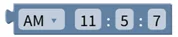
Creates a time constant from the AM/PM, hour, minute, and second fields.
- Input: none (AM/PM, hour, minute, second fields)
- Output: set time [Time]
Duration Input
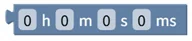
Creates a duration constant from the hours, minutes, seconds, and milliseconds fields.
- Input: none (hours, minutes, seconds, milliseconds fields)
- Output: set duration [Duration]
Current Date

Gets the current system date. Example: 2023-03-20
- Input: none
- Output: current date [Date]
Current Time
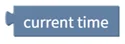
Gets the current system time. Example: 17:11:30
- Input: none
- Output: current time [Time]
Current Timestamp

Returns the current date and time as text in the format YYYY-MM-DD HH:MM:SS. Example: "2023-12-25 17:11:30"
- Input: none
- Output: timestamp text [Text]
System Uptime

Returns the time elapsed since the system booted. It can represent up to 4,294,967,295 milliseconds (about 49.7 days) and starts over from 0 when that is exceeded. Example: 0 hours 60 minutes 30 seconds 500 milliseconds
- Input: none
- Output: elapsed time [Duration]
Unix Timestamp

Returns the time elapsed since January 1, 1970, 00:00:00 UTC. The output is a duration, not a number.
- Input: none
- Output: Unix time [Duration]
Create Date
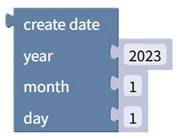
Creates a date from year, month, and day values. Example: 2022, 12, 1 → 2022-12-01
- Input: year [Number], month [Number], day [Number]
- Output: created date [Date]
Create Time
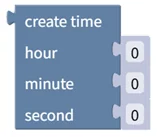
Creates a time from hour, minute, and second values. Example: 14, 56, 30 → 14:56:30
- Input: hour [Number], minute [Number], second [Number]
- Output: created time [Time]
Create Duration
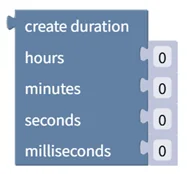
Creates a duration from hours, minutes, seconds, and milliseconds values. Example: 12, 34, 56, 789 → 12 hours 34 minutes 56 seconds 789 milliseconds
- Input: hours [Number], minutes [Number], seconds [Number], milliseconds [Number]
- Output: created duration [Duration]
Add to Date
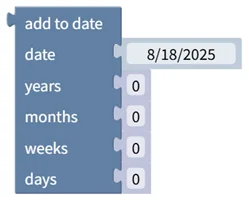
Adds years, months, weeks, and days to a date, or subtracts them when negative values are entered. Example: 2023-03-23 + 1 year - 3 months + 2 weeks - 5 days → 2023-12-31
- Input: date [Date], years [Number], months [Number], weeks [Number], days [Number]
- Output: calculated date [Date]
Add to Time
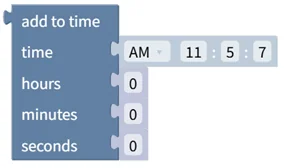
Adds or subtracts hours, minutes, and seconds to a time. If the result becomes negative or exceeds 24 hours, it is calculated as the time on the previous or next day. Example: 10:46:52 - 12 hours + 30 minutes - 50 seconds → 23:16:02
- Input: time [Time], hours [Number], minutes [Number], seconds [Number]
- Output: calculated time [Time]
Add to Duration
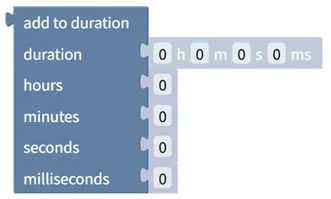
Adds or subtracts hours, minutes, seconds, and milliseconds to a duration. If the result becomes negative, 0 hours 0 minutes 0 seconds 0 milliseconds is returned. Example: 0 hours 10 minutes 20 seconds 100 milliseconds + 1 hour - 30 minutes + 30 seconds - 100 milliseconds → 0 hours 40 minutes 50 seconds 0 milliseconds
- Input: duration [Duration], hours [Number], minutes [Number], seconds [Number], milliseconds [Number]
- Output: calculated duration [Duration]
Compare Dates

Compares two dates with the selected comparison operator. Example: 2023-03-23 < 2023-03-30 → true
- Input: date1 [Date], date2 [Date]
- Output: comparison result [Digital]
Compare Times

Compares two times with the selected comparison operator. Example: 11:04:30 < 12:00:00 → true
- Input: time1 [Time], time2 [Time]
- Output: comparison result [Digital]
Compare Durations

Compares two durations with the selected comparison operator. Example: 0 hours 1 minute 0 seconds 0 milliseconds < 0 hours 2 minutes 0 seconds 0 milliseconds → true
- Input: duration1 [Duration], duration2 [Duration]
- Output: comparison result [Digital]
Split Date

Splits a date into a list of year, month, and day values. Example: 2023-03-23 → [2023, 3, 23]
- Input: date [Date]
- Output: [year, month, day] [List]
Split Time

Splits a time into a list of hour, minute, and second values. Example: 11:10:30 → [11, 10, 30]
- Input: time [Time]
- Output: [hour, minute, second] [List]
Split Duration

Splits a duration into a list of hours, minutes, seconds, and milliseconds values. Example: 12 hours 34 minutes 56 seconds 789 milliseconds → [12, 34, 56, 789]
- Input: duration [Duration]
- Output: [hours, minutes, seconds, milliseconds] [List]
Day of Week

Returns the day of the week of a date as a number (0: Monday … 6: Sunday) or as a name. Select weekday number or weekday name from the dropdown. Example: 2023-03-23 (Thursday) → 3 or "THU"
- Input: date [Date]
- Output: weekday number [Number] or weekday name [Text]
Leap Year Check

Checks whether the year of the date is a leap year (a year in which February has 29 days). Example: 2024-01-01 → true
- Input: date [Date]
- Output: leap year status [Digital]
Days Between Dates
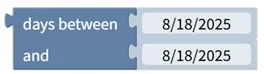
Calculates the difference between two dates (date2 - date1) in days. Example: date1 2023-03-23, date2 2023-06-30 → 99
- Input: date1 [Date], date2 [Date]
- Output: day difference [Number]
Days in Year/Month, Day of Year
Returns the total number of days in the year of the date, the total number of days in its month, or which day of the year the date is. Select days in year, days in month, or day of year from the dropdown. Example: 2023-03-23 → 365 (days in year)
- Input: date [Date]
- Output: days in year, days in month, or day of year [Number]
Date Range Check

Tests whether start date ≤ check date ≤ end date. Both end dates are included in the range. Example: 2023-01-01 ≤ 2023-03-23 ≤ 2023-12-31 → true
- Input: start date [Date], check date [Date], end date [Date]
- Output: within range status [Digital]
Seconds Between Times
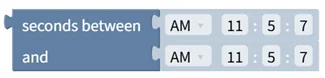
Calculates the difference between two times (time2 - time1) in seconds. Example: time1 09:00:00, time2 11:37:30 → 9,450
- Input: time1 [Time], time2 [Time]
- Output: second difference [Number]
Milliseconds Between Durations
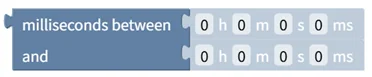
Calculates the difference between two durations (duration2 - duration1) in milliseconds. Example: duration1 0 hours 0 minutes 0 seconds 0 milliseconds, duration2 1 hour 30 minutes 30 seconds 500 milliseconds → 5,430,500
- Input: duration1 [Duration], duration2 [Duration]
- Output: millisecond difference [Number]
Multiply Duration

Multiplies a duration by a number. Example: 3 hours 30 minutes 30 seconds 0 milliseconds × 2 → 7 hours 1 minute 0 seconds 0 milliseconds
- Input: duration [Duration], multiplier [Number]
- Output: scaled duration [Duration]
Duration to Milliseconds

Converts a duration to a total number of milliseconds. Example: 1 hour 30 minutes 30 seconds 500 milliseconds → 5,430,500
- Input: duration [Duration]
- Output: total milliseconds [Number]
Milliseconds to Duration

Converts a number of milliseconds to a duration. Example: 5,430,500 milliseconds → 1 hour 30 minutes 30 seconds 500 milliseconds
- Input: milliseconds [Number]
- Output: duration [Duration]