Text
Creates and manipulates text. Positions count from 1, and 0 is returned when nothing is found. The length of a text is a character count, not a byte count, so a Korean syllable also counts as one character. Blocks that take a position let you count from the start or from the end. Change Case and Check Case apply to letters of the English alphabet only.
Text

Outputs a text constant. Enter the content directly in the block's field.
- Input: none
- Output: text [Text]
Create Text With
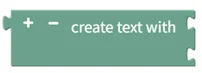
Joins several texts into one. Use the gear button to add or remove entries. Example: "A", "B", "C" → "ABC"
- Input: text1 [Text], text2 [Text] …
- Output: joined text [Text]
Is Empty
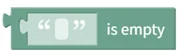
Returns true if the text is empty, false otherwise.
- Input: text [Text]
- Output: empty status [Digital]
Change Case

Converts the text to UPPER CASE, to lower case, or to Title Case. Applies to letters of the English alphabet only.
- Input: text [Text]
- Output: converted text [Text]
Trim Spaces

Removes spaces from both sides, the left side, or the right side of the text, as selected.
- Input: text [Text]
- Output: trimmed text [Text]
Length of Text
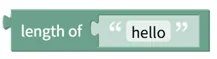
Returns the number of characters in the text. Example: length of "hello" → 5
- Input: text [Text]
- Output: character count [Number]
Find Text

Finds the first or last position where the search text appears in the source text. Positions start at 1, and 0 is returned if not found. Example: first position of "lo" in "hello" → 4
- Input: source text [Text], search text [Text]
- Output: position [Number]
Get Substring

Extracts the specified number of characters starting at a position counted from the start or the end. Example: extract 2 characters from "hello" starting at position 2 from the start → "el"
- Input: source text [Text], start position [Number], character count [Number]
- Output: extracted text [Text]
Insert Text

Inserts other text at the specified position in the text. Example: insert "XX" into "hello" at position 3 from the start → "heXXllo"
- Input: original text [Text], position [Number], text to insert [Text]
- Output: modified text [Text]
Delete Text

Deletes the specified number of characters starting at the specified position. Example: delete 2 characters from "hello" starting at position 2 from the start → "hlo"
- Input: original text [Text], start position [Number], character count [Number]
- Output: modified text [Text]
Replace Text Range

Replaces the specified range of the text with other text. Example: replace 2 characters in "hello" starting at position 2 from the start with "i" → "hilo"
- Input: original text [Text], start position [Number], character count [Number], replacement text [Text]
- Output: modified text [Text]
Is Numeric
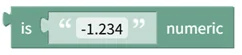
Checks whether the text is a valid number. Integers, decimals, and negative numbers are all recognized. Example: "-123.45" → true
- Input: text [Text]
- Output: numeric status [Digital]
Find Digits/Non-digits

Finds the first or last position where digits or non-digits appear in the text. Positions start at 1, and 0 is returned if not found. Example: first position of digits in "abc123" → 4
- Input: text [Text]
- Output: position [Number]
Check Case

Checks whether all letters in the text are uppercase or lowercase. Non-letter characters are ignored.
- Input: text [Text]
- Output: case match [Digital]
Pad Text

Pads the left or right side of the text with a character until it reaches the target length. Example: pad "123" with "0" on the left to length 6 → "000123"
- Input: original text [Text], target length [Number], padding character [Text]
- Output: padded text [Text]
Find and Replace

Replaces occurrences of the search text with other text. Select all, first, or last to choose which occurrences are replaced. Example: replace all "l" in "hello" with "r" → "herro"
- Input: original text [Text], search text [Text], replacement text [Text]
- Output: modified text [Text]