Local Variables
Temporary variables scoped to this block editor. They are separate from project variables and are not visible in the block editor of another value input or on dashboards. Make values that must be shared into project variables instead (Part 6).
Create Variable
Creates a local variable. Local variables can only be used within the current block editor and serve purposes such as temporarily storing intermediate results.
- Input: none
- Output: none
Set Variable Value
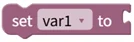
Writes a value to a local variable.
- Input: value to set in the variable [Any type]
- Output: none
Get Variable Value

Reads the value stored in a local variable.
- Input: none
- Output: variable value [Any type]
Change Variable by Number
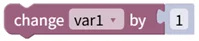
Reads the value stored in a local variable, adds the input number to it, and stores the result back. Entering a negative number subtracts.
- Input: value to add [Number]
- Output: none