Lists
Creates, looks up, and manipulates lists. Items can be of any type; positions count from 1, and 0 is returned when nothing is found. Blocks that take a position offer the position modes # (from the start), # from end, first, last, and random.
Create List With
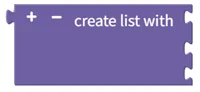
Creates a list from the given items. Use the gear button to add items, or remove them all to create an empty list. Example: "apple", "banana", "grape" → ["apple", "banana", "grape"]
- Input: item1 [Any type], item2 [Any type] …
- Output: list [List]
Create List with Item Repeated

Creates a list consisting of the same item repeated the specified number of times. Example: "hello" repeated 3 times → ["hello", "hello", "hello"]
- Input: item [Any type], repeat count [Number]
- Output: list [List]
Length of List

Returns the number of items in the list. Example: ["apple", "banana", "grape"] → 3
- Input: list [List]
- Output: number of items [Number]
Is Empty List

Returns true if the list is empty, false otherwise. Example: [] → true, ["apple"] → false
- Input: list [List]
- Output: empty status [Digital]
Find Item in List

Returns the position of the first or last occurrence of the item in the list. Positions start at 1, and 0 is returned if the item is not found. Example: first occurrence of "apple" in ["apple", "banana", "apple"] → 1
- Input: list [List], item [Any type]
- Output: item position [Number]
Get/Remove Item from List

Gets, gets and removes, or removes the item at the specified position. Positions start at 1, and #1 is the first position. get returns the item without modifying the original list; get and remove returns the item and removes it from the list; remove removes the item and has no return value.
- Input: list [List], (position [Number])
- Output: item [Any type], or none for remove
Set/Insert Item in List

Sets or inserts an item at the specified position. Positions start at 1, and #1 is the first position. set replaces the existing item with the new item; insert at places the new item between the existing items. Example: insert "X" at position 2 in ["A", "B", "C"] → ["A", "X", "B", "C"]
- Input: list [List], (position [Number]), item [Any type]
- Output: none
Get Sub-list

Extracts the items from the start position to the end position as a new list. Both end positions are included. Example: from position 2 to 4 in ["A", "B", "C", "D", "E"] → ["B", "C", "D"]
- Input: original list [List], start position [Number], end position [Number]
- Output: extracted list [List]
Split Text/Join List

make list from text splits the text at each delimiter into a list; make text from list joins the items into one text with the delimiter between them. The delimiter is custom, newline, or tab. Example: "apple,banana,grape" split by "," → ["apple", "banana", "grape"]; ["apple", "banana", "grape"] joined with "," → "apple,banana,grape"
- Input: text [Text], delimiter [Text] or list [List], delimiter [Text]
- Output: list [List] or text [Text]
Sort List

Returns a sorted copy of the list. The sort type is numeric, alphabetic, or alphabetic, ignore case, and the order is ascending or descending. Example: [3, 1, 4, 1, 5] numeric ascending → [1, 1, 3, 4, 5]
- Input: original list [List]
- Output: sorted list [List]