Type Conversion
Conversion between variable types. The blocks that convert text to a number, date, time, or duration raise an error at execution time when the text is not in the expected format. Integer conversion selects the sign and size (8-, 16-, or 32-bit); values outside the range lose their overflowing bits and become a different value (for example, 172 converted to a signed 8-bit integer → -84). The blocks that convert between integers and byte arrays or binary/hexadecimal text treat the value as a 32-bit unsigned integer, so the result is always 4 bytes (for example, 65450 → 00 00 FF AA).
Convert to Number

Converts a digital, number, or text value to a number. Text that cannot be converted causes an error. Example: true → 1, false → 0, "123" → 123, "ABC" → error
- Input: value [Digital, Number, Text]
- Output: converted number [Number]
Convert to Text
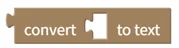
Converts a value of any type to text. Example: true → "true", 123 → "123", 2023-03-23 → "2023-03-23"
- Input: value [Any type]
- Output: converted text [Text]
Convert to Digital
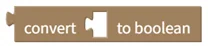
Converts a number to a digital value (true or false). Example: 1 → true, 0 → false
- Input: value [Digital, Number]
- Output: converted digital value [Digital]
Convert to Integer Type

Converts the input value to the selected integer type: signed 8-bit, unsigned 8-bit, signed 16-bit, unsigned 16-bit, signed 32-bit, or unsigned 32-bit. Example: convert 172 to a signed 8-bit integer → -84
- Input: value [Number]
- Output: converted integer value [Number]
Convert Text to Date

Converts text to a date. Text that is not in a valid date format causes an error. Example: "2022-12-01" → 2022-12-01
- Input: text [Text]
- Output: converted date [Date]
Convert Text to Time

Converts text to a time. Text that is not in a valid time format causes an error. Example: "14:27:30" → 14:27:30
- Input: text [Text]
- Output: converted time [Time]
Convert Text to Duration

Converts text to a duration. The duration format is "0h 0m 0s 0ms" or "0:0:0:0"; text that is not in either format causes an error. Example: "12:34:56:789" → 12 hours 34 minutes 56 seconds 789 milliseconds
- Input: text [Text]
- Output: converted duration [Duration]
Convert Text to Color
Converts text to a color value. The input text must be in hexadecimal color format, such as "#FF0000" for red. Shown in the toolbox for project version 0.16.0 and later. Example: "#00FF00" → green
- Input: text [Text]
- Output: color value [Color]
Convert Byte Array to Integer

Converts a byte array to an unsigned 32-bit integer. The first byte of the byte array is the MSB (Most Significant Byte). Example: FF AA → 65450
- Input: byte array [Byte Array]
- Output: converted integer value [Number]
Convert Integer to Byte Array

Converts an integer to a byte array. The input value is automatically converted to a 32-bit integer, and the first byte of the byte array is the MSB. Example: 65450 → 00 00 FF AA
- Input: integer [Number]
- Output: converted byte array [Byte Array]
Convert Binary Text to Integer

Converts binary text to an unsigned 32-bit integer. The first bit is the MSB (Most Significant Bit), and the text may contain spaces. Example: "1111 1111 1010 1010" → 65450
- Input: binary text [Text]
- Output: converted integer value [Number]
Convert Integer to Binary Text

Converts an integer to 32-digit binary text. The input value is automatically converted to a 32-bit integer, and the first bit is the MSB. Example: 65450 → "00000000000000001111111110101010"
- Input: integer [Number]
- Output: converted binary text [Text]
Convert Hexadecimal Text to Integer

Converts hexadecimal text to an unsigned 32-bit integer. The first byte is the MSB, and the input text must be in one of four formats: no separator (00AAFF), space-separated (00 AA FF), comma-separated (00, AA, FF), or colon-separated (00:AA:FF). Example: "FF AA" → 65450
- Input: hexadecimal text [Text]
- Output: converted integer value [Number]
Convert Integer to Hexadecimal Text

Converts an integer to hexadecimal text. The input value is automatically converted to a 32-bit integer, and the first byte is the MSB. Example: 65450 → "00 00 FF AA"
- Input: integer [Number]
- Output: converted hexadecimal text [Text]
Convert Byte Array to UTF-8 Text

Interprets a byte array as UTF-8 text. Example: EA B0 80 EB 82 98 EB 8B A4 → "가나다"
- Input: byte array [Byte Array]
- Output: UTF-8 text [Text]
Convert UTF-8 Text to Byte Array

Creates a byte array by encoding text as UTF-8. Example: "가나다" → EA B0 80 EB 82 98 EB 8B A4
- Input: UTF-8 text [Text]
- Output: byte array [Byte Array]
Convert Hexadecimal Text to Byte Array

Converts hexadecimal text to a byte array. The input text must be in one of four formats: no separator (00AAFF), space-separated (00 AA FF), comma-separated (00, AA, FF), or colon-separated (00:AA:FF). Example: "AF 00 B0" → AF 00 B0
- Input: hexadecimal text [Text]
- Output: converted byte array [Byte Array]
Convert Byte Array to Hexadecimal Text

Converts a byte array to space-separated hexadecimal text. Example: AF 00 B0 → "AF 00 B0"
- Input: byte array [Byte Array]
- Output: converted hexadecimal text [Text]