Local Functions
Functions defined and called within this block editor. Functions with and without a return value can be defined, and input parameters are added with the block's gear button. A defined function is run from another block in the same editor with a call block, which also comes in two forms depending on whether a value is returned. The Return If block can only be used inside a local function.
Function (no return value)
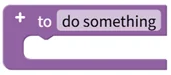
Creates a local function without a return value. Input parameters can be added with the gear button, and the created function is called and run from other blocks within the current block editor.
- Input: none
- Output: none
Function (with return value)
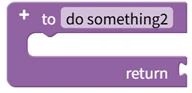
Creates a local function with a return value. Input parameters can be added with the gear button, and the value connected to the return input at the bottom of the block becomes the function's return value.
- Input: return value [Any type]
- Output: none
Return If

Returns a value part-way through the function when the condition is satisfied. This block can only be used inside a local function block.
- Input: condition [Digital], return value [Any type]
- Output: none
Function Call (no return value)
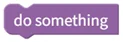
Runs a previously defined local function that has no return value.
- Input: the parameters defined in the function (if any)
- Output: none
Function Call (with return value)
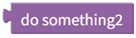
Runs a previously defined local function that has a return value and returns its result.
- Input: the parameters defined in the function (if any)
- Output: function return value [Any type]