XML
Parses XML text, looks up and edits the name, value, attributes, and child elements of an XML element, and converts it back to text. The editing blocks return the modified XML element as their output.
[2] counts from 1, while the position of the
Get/Delete XML Child Element by Position blocks counts from 0. The same second child is
phone[2] in XPath but position 1 in the position blocks.
Convert Text to XML Element

Converts (parses) XML-formatted text into an XML element.
- Input: text [Text]
- Output: XML element [XML Element]
Find XML Value by Path

Returns the value, attribute, or element at the specified XPath in an XML element. Path examples: /bookstore/books[1]/title, /book/@id. Bracketed numbers in XPath count from 1.
- Input: XML element [XML Element], path [Text]
- Output: path value [Digital, Number, Text, or XML Element]
For example, in the XML structure below, the value at path /user/profile/contact/phones/phone[2] is "010-9876-5432".
<user>
  <profile>
    <name>Alice</name>
    <contact>
      <phones>
        <phone>010-1234-5678</phone>
        <phone>010-9876-5432</phone>
      </phones>
      <email>alice@example.com</email>
    </contact>
  </profile>
</user>
Create XML Element
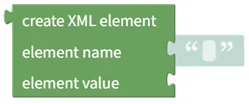
Creates a new XML element with a name and a value.
- Input: element name [Text], element value [Digital, Number, Text]
- Output: new XML element [XML Element]
Get XML Element Name

Returns the name (tag name) of an XML element.
- Input: XML element [XML Element]
- Output: element name [Text]
Change XML Element Name

Changes the name (tag name) of an XML element.
- Input: XML element [XML Element], new name [Text]
- Output: modified XML element [XML Element]
Check if XML Element is Empty

Returns true if the XML element has neither a value nor child elements, false otherwise.
- Input: XML element [XML Element]
- Output: empty status [Digital]
Check if XML Element Has Text Value

Returns true if the XML element has a text value, false otherwise.
- Input: XML element [XML Element]
- Output: value existence [Digital]
Get XML Element Text Value

Gets the text value of an XML element. Returns empty text if there is no value or the element only contains child elements.
- Input: XML element [XML Element]
- Output: element value [Text]
Change XML Element Text Value

Changes the text value of an XML element.
- Input: XML element [XML Element], new value [Digital, Number, Text]
- Output: modified XML element [XML Element]
Check if XML Element Has Attributes

Returns true if the XML element has one or more attributes, false if it has none.
- Input: XML element [XML Element]
- Output: attribute existence [Digital]
Check if XML Element Has Specific Attribute

Returns true if the XML element has an attribute with the specified name, false otherwise.
- Input: XML element [XML Element], attribute name [Text]
- Output: attribute existence [Digital]
Get XML Attribute Value

Gets the value of the attribute with the specified name from an XML element.
- Input: XML element [XML Element], attribute name [Text]
- Output: attribute value [Text]
Add Attribute to XML Element
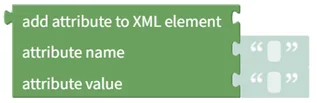
Adds an attribute with the specified name and value to an XML element.
- Input: XML element [XML Element], attribute name [Text], attribute value [Text]
- Output: modified XML element [XML Element]
Change XML Attribute Value
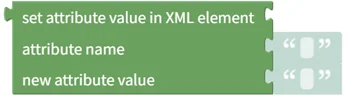
Changes the value of the attribute with the specified name in an XML element.
- Input: XML element [XML Element], attribute name [Text], new value [Text]
- Output: modified XML element [XML Element]
Delete XML Attribute

Deletes the attribute with the specified name from an XML element.
- Input: XML element [XML Element], attribute name [Text]
- Output: modified XML element [XML Element]
Delete All XML Attributes

Deletes all attributes from an XML element.
- Input: XML element [XML Element]
- Output: modified XML element [XML Element]
Check if XML Element Has Child Elements

Returns true if the XML element has one or more child elements, false if it has none.
- Input: XML element [XML Element]
- Output: child existence [Digital]
Check if XML Element Has Specific Child Element

Returns true if a child element with the specified name exists in the XML element, false otherwise.
- Input: XML element [XML Element], child name [Text]
- Output: child existence [Digital]
XML Element Child Count

Returns the number of child elements in an XML element.
- Input: XML element [XML Element]
- Output: child count [Number]
Get XML Child Element by Name

Gets the child element with the specified name from an XML element.
- Input: XML element [XML Element], child name [Text]
- Output: child XML element [XML Element]
Get XML Child Element by Position

Gets the child element at the specified position from an XML element. Positions start at 0.
- Input: XML element [XML Element], child position [Number]
- Output: child XML element [XML Element]
Add Child Element to XML Element

Adds a child element to an XML element.
- Input: XML element [XML Element], child element [XML Element]
- Output: modified XML element [XML Element]
Delete XML Child Element by Name

Deletes the first child element with the specified name from an XML element. Even when several children share the name, only the first one is deleted.
- Input: XML element [XML Element], child name [Text]
- Output: modified XML element [XML Element]
Delete XML Child Element by Position

Deletes the child element at the specified position from an XML element. Positions start at 0.
- Input: XML element [XML Element], child position [Number]
- Output: modified XML element [XML Element]
Delete All XML Child Elements

Deletes all child elements from an XML element.
- Input: XML element [XML Element]
- Output: modified XML element [XML Element]
Convert XML Element to Text

Converts an XML element to text. Turn on the checkbox to add an XML declaration on the first line of the text.
- Input: XML element [XML Element], add XML declaration [Checkbox]
- Output: XML text [Text]